Can AI Show a Client Their Table Before They Book?
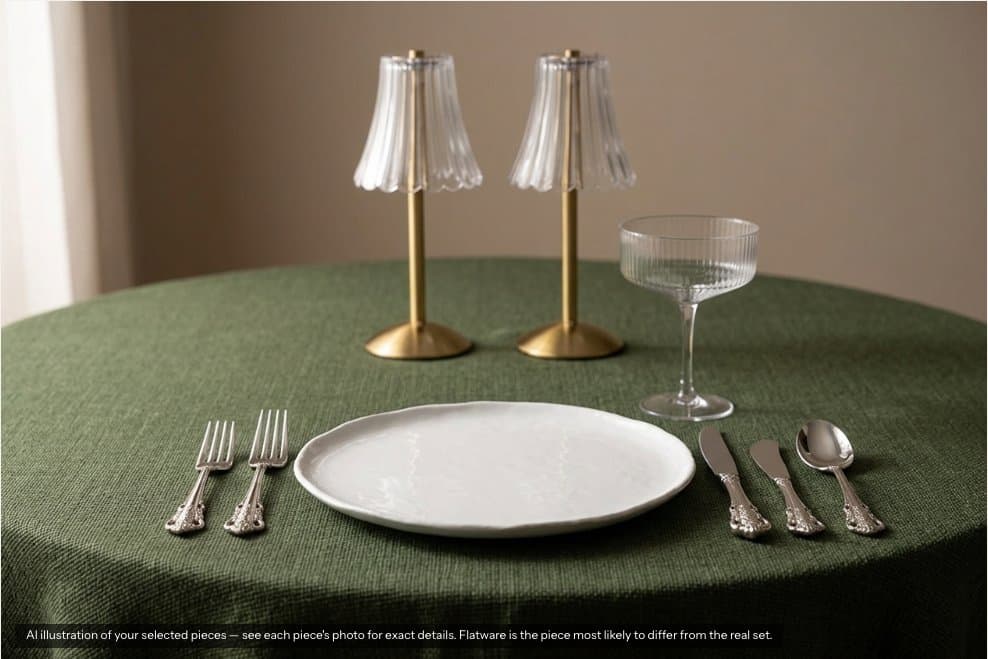
Yes, if you ask the model for one close-up place setting made from the client’s actual pieces, and label the result as an illustration. Ask it for a whole dressed table and it starts inventing furniture. That is what we found building the Build a Table tool for an event rental company.
By George Shvaya · · 6 min read
The problem it solves
A rental catalog shows each piece alone on a plain background. A couple choosing between an olive linen and a wheat one has to imagine the plate, the glass and the candle on top of it. Showrooms solve that with a mock table. Websites mostly do not.
On Linen & Oak’s site a visitor picks a table linen, plates, glassware, flatware and a centerpiece from 270 pieces that belong on a place setting. The chosen pieces show side by side straight away, as they were photographed. One button turns up to five of them into a photograph of the setting.
What we tried first
The first version laid cut-out product photos over a generated empty room. It was honest, since every pixel of every piece was real, but it looked like a toy, so we threw it out. We replaced it with an image model that takes the catalog photos of the chosen pieces and draws them together on a table.
What the model got right and wrong
Before shipping we ran rounds of tests with Google’s Gemini image models, comparing each output with the real pieces.
| Test | What came back |
|---|---|
| A table for four guests, fast model | Spoons came out oval, one goblet went missing, the lantern was distorted and the cloth too brown. |
| A table for four guests, higher-end model | A plate rim was lost and the model invented chairs, floral tables and chafing dishes nobody chose. |
| One close-up place setting, fast model | Linen, plate pattern and rim, and all three glass shapes came out faithful. The lantern handle was off. |
| A different selection, not tuned | Four of five pieces faithful. The flatware was wrong again: oval spoon, thicker handles. |
| A napkin chosen as the linen | Our prompt called the napkin a tablecloth and the model spread it across the table. A bug on our side, fixed. |
Three things followed from those tests.
- One place setting, not a whole table. With fewer objects to draw, the model kept the details that matter to a client: the plate rim, the glass shape, the linen weave.
- The faster model. The higher-end model was less faithful on every piece we compared.
- Flatware gets a warning. It drifted in three of four tests. The site still offers it, and when flatware is in the photo the label says it is the piece most likely to differ from the real set.
We also tested using a second model to check each photo before showing it. The checkers rejected good photos and passed bad ones, and added ten to twenty seconds. A clear label on the image turned out to be more honest than a gate that was wrong part of the time.
Guardrails a rental site needs
- Label it on the image. “AI illustration of your selected pieces” sits on the photo itself, not in a footnote, and the real product photos stay beside it.
- The visitor never writes the prompt. The browser sends only which pieces were chosen. The server looks up each piece’s own catalog photo and builds the instruction, so nobody can make the site draw something else or fetch an outside image.
- A button, not an automatic render. Each photo costs money and takes seconds. Generating on every tap would burn both while the visitor is still browsing.
- A cap. Five pieces per photo keeps the setting legible and the cost bounded.
- A safe fallback. If a photo cannot be made, the table area shows the chosen pieces as photographed. The visitor never sees an error where the table should be.
Where it fits in the sale
The photo is a step toward a quote, not the end of the visit. Under the photo, a button starts a quote with those pieces, and the side panel adds the whole table to the visitor’s event list. The request then reaches the business by email and, on this site, as a quote in Goodshuffle Pro (see connecting Goodshuffle Pro to a custom website).
Is it worth building?
For a rental company whose pieces are chosen together, like linens, tabletop and centerpieces, it answers the question visitors cannot answer from a product grid. It is less useful for a company that rents mostly tents or large furniture, where layout matters more than the place setting. It needs good product photos to work from, and someone to watch the image costs. More on what we build for rental companies on the event rental websites page.