Nonprofits · Updated
Websites for nonprofits
A nonprofit website has to do several jobs at once: take a donation in one step, give volunteers and local businesses a way to help, sell tickets to the fundraiser, and serve the people the mission exists for. We build custom nonprofit sites that do all of that and that search engines and AI assistants can read correctly.
By George Shvaya, founder of Webvello · Published
Key takeaways
- A nonprofit site serves several audiences at once, so the first screen should offer each of them one clear next step.
- Giving works best when it stays on the platform you already use, with the donate button on every page and on phones.
- Useful resources for the people you serve are the pages most likely to be found in search, and they show donors the work.
- Structured data can mark the organization as an NGO with 501(c)(3) status and each fundraiser as an Event.
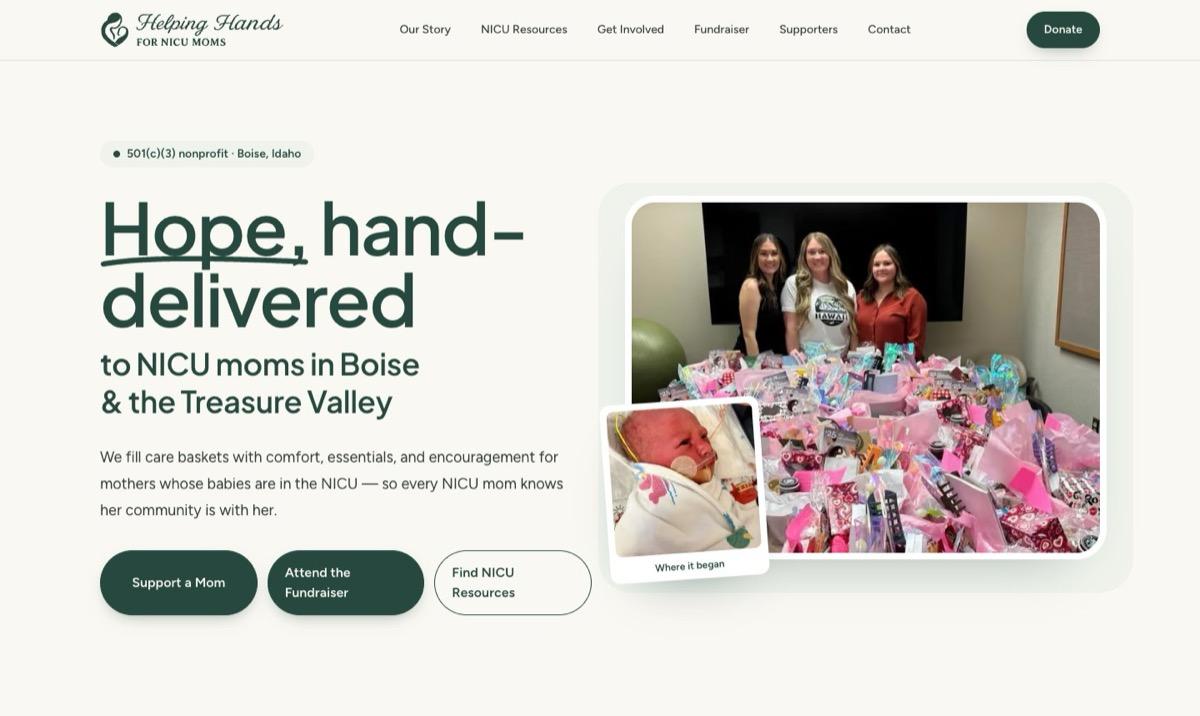
- Our live example is Helping Hands for NICU Moms, a Boise-area 501(c)(3) whose site we rebuilt in October 2026.
A nonprofit site we built: Helping Hands for NICU Moms
Featured build
Helping Hands for NICU Moms
A 501(c)(3) in the Boise area, started by two sisters, that delivers care baskets to mothers whose babies are in the NICU. We replaced its Squarespace site with a custom build in October 2026 and donated the work.
- Three clear ways in from the first screen: give, attend the fundraiser, or find help
- Donations and dinner tickets through the charity’s own Givebutter campaign
- A resource hub with 18 guides, a corrected-age calculator and printable checklists for NICU families
- A table of local hospital NICUs that lists only what each hospital publishes about itself
- Volunteer, donation-drive and business-sponsor pages, each with its own form
- NGO and 501(c)(3) markup, Event markup for the fundraiser, and old Squarespace links redirected
Who visits a nonprofit website, and what they need
| Visitor | Their question | What the site needs |
|---|---|---|
| Donor | Is this real, and where does my gift go? | A one-step donate button on every page, what a gift becomes, and a link to public proof of status |
| Volunteer | What can I do, and when? | Specific roles and a short form that reaches a person |
| Local business | How do we sponsor or donate items? | A partner page, a wish list, and a public thank-you for supporters |
| Person you serve | Can you help me right now? | Plain-language resources, local information and a way to ask for help |
| Event guest | When, where, how much? | An event page with date, place, ticket price and a ticket button |
On the NICU Moms site those groups map to the three hero buttons, a get involved page for volunteers and drives, a supporters page for businesses, and the NICU resources hub for families.
What we build into a nonprofit website
Giving in one step
More than one way to help
Proof donors can check
Resources for the people you serve
Events that sell tickets
Pages machines can read
Want a second look at your nonprofit site?
Send us your site. We will review it for giving, volunteer paths, speed and search visibility, and send back what we would change first.
How a nonprofit website project runs
- 1
Start from what you have
Your current site, your donation platform, photos, and the questions people already ask you by email and social media. - 2
Map the audiences
Donors, volunteers, sponsors, the people you serve and event guests each get a path. Every old URL is mapped to its new page. - 3
Write in your voice
We draft from your own words and send them back for review. Facts about partners, hospitals or programs come from the source, and anything we cannot verify stays out. - 4
Connect giving and forms
Donations and tickets stay on your platform. Contact, volunteer and sponsor forms send to the inbox you choose, and we test each one before launch. - 5
Launch and hand over
We connect your domain, submit the sitemap to Google Search Console and show your team how to request changes.
Moving off a builder? See Squarespace to Next.js and Wix to Next.js. For a site that already works and needs more visitors, start with nonprofit SEO.
Google Ad Grants and your website
Google reviews the site before approving an Ad Grants account and expects it to stay in line with the program’s website policy afterward. Our Google Ad Grants website requirements guide lists what the policy asks for, quoted from Google, and what to fix before you apply.
Related services and resources
Pages that go deeper on the pieces this one touches.
The full build: screenshots, services and stackNonprofit website checklist
What to check before launch, with sourcesGoogle Ad Grants website requirements
The website rules, quoted from GoogleNonprofit SEO
Search strategy for an existing nonprofit siteWebsite design
How we design and build custom sitesWebsite accessibility
WCAG audits and fixes
Common questions
Straight answers to what owners ask us first.
Do you work with small nonprofits?
Yes. Helping Hands for NICU Moms was started by two sisters in the Boise area. We scope the site to what the team can keep current, which usually means a small number of strong pages rather than a large site nobody updates.
Do we have to change donation platforms?
No. The site links to or embeds the platform you already use, so donor records, receipts and recurring gifts stay where they are. On the NICU Moms site, donations and fundraiser tickets both go through the charity’s Givebutter campaign.
Do you build nonprofit websites for free?
We donated the Helping Hands for NICU Moms build. Other projects are scoped case by case, so tell us about your organization and we will tell you what we can do.
Will we be able to update the site ourselves?
That depends on what changes often. Events, supporter lists and wish lists can be kept as simple data or connected to a content editor. We decide this with you during planning, before anything is built.
Should our nonprofit website use NGO schema markup?
Yes, if it describes the organization accurately. Schema.org has an NGO type and a nonprofitStatus property with a value for 501(c)(3) organizations. It helps search engines and AI assistants identify the organization; it does not create a special search result by itself.
Tell us about your organization
Share your current site and what you need it to do. We will reply with what a rebuild or a set of fixes would involve.